
PoxiLauncher · free launcher for Minecraft: Java Edition
Open your world. Your friends join from home.

No port forwarding, no rented server, no extra software. Open your game in one click, and the whole group always has the same mods.
Blue warning from Windows? More info → Run anyway
Your PC opens the world “Group Survival” to your friends: zero ports, zero extra software and nothing to rent. Marta and Pepe are already in from their homes, and Luis is joining.
-
MartaIn gameValencia
-
PepeIn gameBilbao
-
LuisJoining…In gameSevilla
Playing with friends shouldn’t need a tutorial.
Everything you used to set up by hand, PoxiLauncher does for you.
- Before: Forwarding ports on your routerNow: You open your world, your friends join
- Before: Installing extra software to play onlineNow: Nothing extra to install
- Before: Renting a server every monthNow: Your PC is the server, for free
- Before: Passing mods around in a .zip on DiscordNow: One pack that syncs itself
- Before: “It crashes for me but not for you”Now: Same versions for everyone, and if it breaks, it tells you why
- Before: The world lives on one person’s PCNow: The group world, in the cloud
01Host without opening ports
Your PC is the server. Leave the router alone.
Open your world right from the launcher and your friends join from their homes. Nothing to configure: no router, no IPs, no extra software.
- One click and you’re all inOpen your world like you always do, and it shows up for your friends to join.
- Want a world that never sleeps? Your own server in one clickCreate a server from any instance (Vanilla, Fabric, Forge or NeoForge), with its server mods and a live console. Your friends join just as easily.
- Only your friends get inYour game is for your PoxiLauncher friends. Nobody else can see it.
02Everything synced with your group
Same mods for everyone. Always.
Share an instance as a pack and your friends get exactly the same mods, resource packs and shaders, down to the version. When someone changes something, everyone else gets it to accept in one click.

03Mods without leaving the launcher
Search, install, play. It sorts out the weird stuff.
Modrinth is built in: mods, resource packs, shaders and modpacks, filtered by your version and loader.
- Dependencies add themselvesAnd it flags updates, even for mods you dropped in by hand.
- One-click optimizeInstalls the performance mods available for your version: Sodium, Lithium, FerriteCore…
- Warnings before you playA missing dependency, a duplicate mod or two that clash: it tells you when you hit Play and fixes it in one click.

04Join my friend
Friend already playing? One button and you’re in.
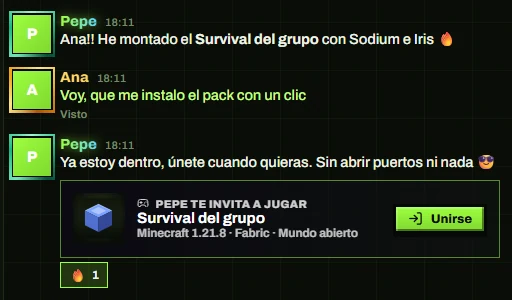
PoxiLauncher installs their exact pack if you don’t have it and drops you straight into their game, whether it’s an open world or a server.

From zero to playing in three steps.
Download it
A 1 MB installer that grabs the rest and updates itself. It installs Minecraft, Java and the loaders for you.
Set up an instance and share it
Pick a version and loader, add mods from Modrinth and share it as a pack with your group. Or just send them a link.
Hit Play
Open your world to your friends and they click “Join”. No ports, no IPs, no hassle.
05Nothing breaks
Try anything. Every change can be undone.
- A snapshot before every changeEvery mod change goes into the history: “back to how it was” in one click. And if the change came from the pack, the whole group rolls back.
- Backups of your worldsMade automatically every time you play, ready to restore whenever you want.
- Crashes explained in plain EnglishIf Minecraft closes on its own, it reads the log and tells you what happened: an incompatible mod, not enough memory, a missing dependency… With a one-click fix when there is one.
- Your Microsoft session, encrypted on your PCIt never goes through our server.
- Verified downloadsMinecraft, Java, mods and loaders come from their official source and are checked by hash before use.
- No admin rights, everIt installs just for your user and never asks for special permissions.
48 things it does for you.
The stuff above is what you notice most. Here’s everything else.
Playing together 12
- Host without opening ports or extra software
- Your server in one click: Vanilla, Fabric, Forge or NeoForge
- Packs synced across your group
- Group world in the cloud
- “Join my friend” in one click
- Invite links that expire after 7 days
- Live server console
- “The pack has changes”: review, then accept
- The group rolls back to the previous version
- Locked while someone hosts the world
- Invites straight from the chat
- Instances saved to your account
Mods & instances 12
- Built-in Modrinth: mods, shaders, resource packs and modpacks
- Dependencies that add themselves
- One-click optimize
- Warnings before you play, with a fix
- Fabric, Quilt, Forge and NeoForge
- Mod updates detected by hash
- Downgrade or lock any mod
- Tags to toggle mods together
- Import and export .mrpack
- Server pack without client-only mods
- Shared options, keybinds and servers
- Automatic RAM for your PC
Friends & chat 12
- Live friends list: what and where they play
- Chat: DMs and group chats
- In-game overlay with Shift + F1
- GIFs, stickers and 7TV emotes
- Your own profile: colors, banner, frame
- F12 screenshots and 30 s clips
- A heads-up when a friend starts playing
- Mentions, reactions and pinned messages
- “Typing…” and “seen”
- Screenshots and clips straight to chat
- Nicknames only you can see
- Your game in your Discord status
Peace of mind 12
- History with “undo”
- Automatic backups of your worlds
- Crashes explained in plain English
- Updates itself and shows you what’s new
- No admin rights, ever
- Official Java, downloaded for you
- Microsoft session encrypted on your PC
- Downloads verified by hash
- Microsoft and offline accounts
- Skins and capes with a 3D viewer
- Block and report
- Delete your account anytime
Questions people ask.
What people ask most before downloading, answered straight.
Is it really free?
Yes. No ads, nothing to pay for. It’s a personal project with its code out in the open on GitHub (PolyForm Noncommercial 1.0.0 license).
Do I really not need to forward ports?
Really. Open your world from the launcher, invite your friends and they join from their homes. No router settings, and no Hamachi, Radmin or anything like it.
How many friends can join at once?
Up to 16 friends at once in your game.
What if my PC is off?
If you use the group world, everyone else can keep playing: it’s saved in the cloud and anyone in the group can host it from their PC. When you’re back, you just pull the latest version. A world you open from your own PC, on the other hand, closes when you do.
And if someone in the group has a PC that can stay on, they can set up your server there in one click.
Do my friends need PoxiLauncher too?
Yes. The social side (friends, chat, packs, the group world, opening your game and “Join”) runs on a free PoxiLauncher account: just a username and a password. You don’t need that account to play Minecraft.
Which Minecraft account do I use?
Your Microsoft account (premium) or an offline account, and you can have several. Your Microsoft session is stored encrypted on your PC and never goes through our server.
What if a mod breaks everything?
It takes a snapshot before every mod change, so you’re one click away from how things were. If the change came from the pack, the whole group can roll back to the previous version. And if Minecraft closes on its own, it tells you why.
Windows shows a blue warning when I open it
That’s SmartScreen: it shows up because the file isn’t signed yet. Click More info and then Run anyway.
PoxiLauncher never asks for admin rights, and its code is on GitHub for anyone who wants to check it.
How old do I need to be?
PoxiLauncher accounts are for ages 14 and up.
Does it work on Mac or Linux?
For now, only on Windows 10 and 11.
Is it official Minecraft software?
No. PoxiLauncher is an independent project: it’s not an official Minecraft product, and it’s not approved by or associated with Mojang or Microsoft.
Tonight, everyone in the same world.
Download it, send your friends the link and hit Play. PoxiLauncher handles the rest.
For Windows 10 & 11 · Rather not install? Portable version